Most beginner advice on affiliate links stops at two rules: put the link somewhere visible and disclose it properly. Both very much matter, but they treat the click as a side effect of good content rather than as something you can directly influence. A reader can love your article, trust every word, and still scroll straight past the link because nothing about that specific moment asked for a click.
The click and the sale are two separate problems, and they happen in two different places. The sale depends on the offer page, the price, the reviews, the guarantee, things mostly out of your hands. The click depends entirely on what you build around the link: its format, its wording, the sentence before it, and the small trust cues that remove hesitation. This article is only about that first problem. Fix it and you send more of your existing traffic toward the offer page without writing a single extra word of new content.
The Click Is a Different Problem Than the Sale
A low click-through rate and a low conversion rate look similar from the outside, both show up as fewer commissions, but they come from different causes and need different fixes. If people click and don’t buy, the problem lives on the offer page or in the mismatch between what you promised and what they found. If people read your content and never click at all, the problem lives in your article, specifically in the half-second decision a reader makes when their eyes pass over a link.
That half-second decision is driven by things you can control directly: does the link look like something worth clicking, does the text around it make the click feel safe, and does the page give any reason to hesitate. None of this touches the sale. A reader can click through, read the offer page, and decide not to buy, and that’s a separate conversation entirely covered in how to fix low affiliate marketing conversion rates. This piece is about getting them there in the first place.
Where You Place the Link Changes Whether It Gets Seen
A link buried in the fourth paragraph of dense text gets read past the same way a street sign gets read past by someone driving too fast to look for it. Readers skim. Their eyes move in patterns, pausing at line breaks, bolded words, and the start and end of paragraphs. A link sitting mid-sentence in a long block of text competes with everything else on that line for attention it will usually lose.

Three placements tend to perform better than a link dropped at random:
-
Right after you’ve made a specific claim the reader just nodded along with, while the agreement is still fresh.
-
At a natural pause point, such as the end of a short paragraph, where the reader’s eye is already stopping.
-
Near the top of a long article, for readers who came in already leaning toward a decision and don’t want to read 2,000 words to find it.
The common mistake is treating every link the same way, repeating one placement pattern through an entire article regardless of where the reader’s attention actually is. Read your own draft the way a skimmer would, not the way you wrote it, and mark the points where your eye naturally slows down. Those are your placements.
Anchor Text That Earns a Click vs Anchor Text People Skip Over
“Click here” and “this link” tell the reader nothing about what they’re about to do. The eye slides past generic anchor text because it carries no information, and a brain scanning for relevance has nothing to latch onto. Specific anchor text does the opposite: it describes the destination clearly enough that the reader can decide, in that instant, whether it’s worth their time.
Compare “check the price here” against “see current pricing for the XYZ model.” The second version tells the reader exactly what they’ll find, which lowers the mental cost of clicking because there’s no uncertainty about what happens next. Anchor text that names the product, the specific benefit, or the exact action (“compare the two models,” “read the full warranty terms”) consistently earns more clicks than anchor text that just points vaguely at “more information.”
Avoid anchor text that oversells, though. “The best deal you’ll ever see” sets an expectation the offer page then has to match, and if it doesn’t, you’ve traded a click for a bounce. Precise and honest beats exciting and vague every time.
Buttons, Inline Text, and the Visual Weight of a Link
A text link and a button ask different things of a reader, and neither is automatically better. A button says “this is an action, make a decision now.” It works well after you’ve built a case and the reader is ready to act, such as at the end of a product review or comparison. An inline text link says “here’s more context if you want it,” and it works better mid-article, where interrupting the reading flow with a large visual element would feel pushy.
The mistake beginners make most often is using one format everywhere regardless of context, usually because their theme or page builder defaults to it. A button dropped into the middle of a paragraph the reader is still absorbing can feel like an ad breaking into an article. A plain text link at the bottom of a review, after the reader has already decided, can be easy to miss entirely because nothing marks it as the next step.
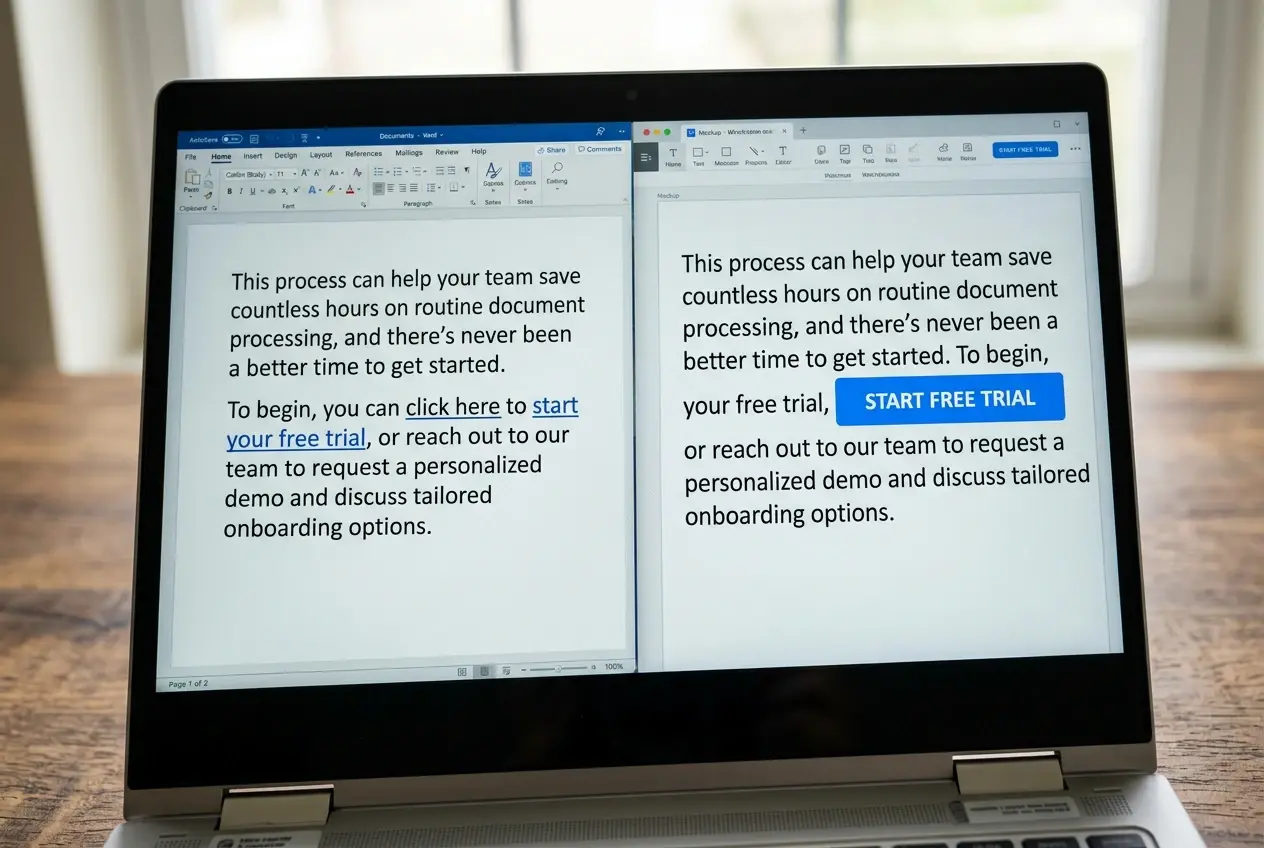
Visual weight also matters at a smaller scale: bold text, a different color, or a short line of white space around a link all increase how likely it is to get noticed, but each one carries an implicit promise of importance. If every third sentence has a bolded link, none of them stand out anymore. Save the heavier visual treatment for the links that matter most in a given piece.
Writing the Sentence Before the Link to Build Curiosity Without Overpromising
The sentence right before a link does more work than the link itself. It sets up a question, a gap, or a specific reason to click, and the link becomes the answer. Without that setup, even a well-placed, well-worded link is just sitting there waiting to be noticed on its own merits, which is a much harder ask.
A flat version: “You can find this tool here.” A version that does the work: “The free version covers the basics, but the paid tier adds a feature most people don’t realize they need until their list passes a thousand subscribers.” The second sentence creates a specific curiosity gap, something the reader now wants resolved, and the link is the resolution.
This only works if the curiosity is honest. If the sentence promises something the offer page doesn’t actually deliver, you get the click but lose the trust, and that reader is less likely to click anything else you link to later in the article or in future content. The goal is a sentence that makes the click feel necessary, not a sentence that makes the click feel tricked out of them.
Trust Signals That Lower Hesitation in the Second Before a Click
Even with a well-placed link, strong anchor text, and a good setup sentence, some readers hesitate right before clicking because affiliate links carry an automatic, low-level suspicion in a lot of readers’ minds. A few things lower that hesitation without requiring a single extra sentence of persuasion:

-
A clear, early disclosure that the article contains affiliate links, stated plainly rather than buried in fine print, actually increases trust because it reads as honest rather than evasive.
-
Specific detail in the surrounding copy, naming exact features, numbers, or limitations instead of vague praise, signals that you’ve actually used or researched the thing you’re linking to.
-
Consistency between what the link’s anchor text promises and what the destination page shows, so the reader never lands somewhere that feels like a mismatch.
-
Evidence that you’re not only recommending the thing that pays the highest commission, mentioning a limitation or a case where a different option might suit the reader better.
None of these require extra technical work. They’re a matter of what you choose to say in the two or three sentences surrounding every link. Readers notice the difference between an article that sounds like it’s selling and one that sounds like it’s informing, even when the information is pointing at the same product.
Testing Variations Without Guessing: What to Track and For How Long
Guessing which anchor text or placement works better is slower than just testing it, especially once you have enough traffic on a page to generate a meaningful number of clicks. The process doesn’t need to be complicated: change one variable at a time, anchor text or the sentence before the link, not both at once, so you know which change actually moved the number.

Track click-through rate specifically, not just overall commissions, since commissions get affected by things outside this test entirely, like seasonal demand or a program changing its offer. A link tracking tool or your affiliate dashboard’s click data will show you the rate directly. For detail on setting that tracking up properly, best affiliate marketing tracking and analytics tools for conversions covers the options.
Give a test at least two weeks before drawing a conclusion, longer if the page gets light traffic, since a handful of clicks in either direction can look like a trend when it’s really just noise. Change one thing, measure it, then change the next thing. Stacking multiple changes at once might improve the number, but you’ll have no idea which change actually did it, which means you can’t repeat the win on your next article.
Pick one article with a flat click-through rate, change only the anchor text and the sentence before the link, and compare the results after two weeks before touching anything else.